
Timeline
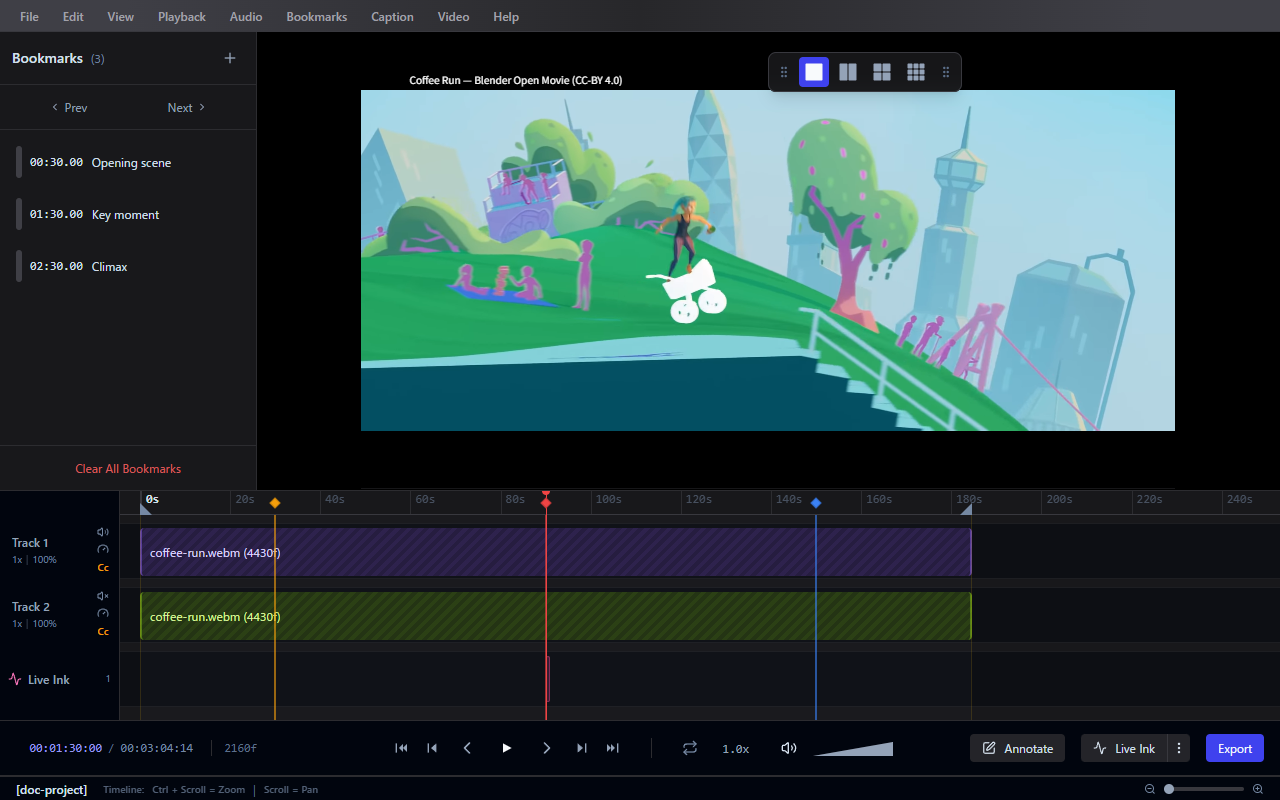
The timeline provides a unified view of your project, allowing you to navigate media, manage bookmarks, select ranges for export, and control track-specific settings.
Bookmarks
- Press B or use the toolbar to add bookmarks at important moments.
- Navigate quickly between bookmarks using Next Bookmark and Previous Bookmark shortcuts, or by clicking the markers on the timeline ruler.
- Bookmarks are saved with the project file.
Range Selection
Set In/Out points to define a specific range on the timeline:
- Set Loop In: Start of the selected range
- Set Loop Out: End of the selected range
The selected range is used for:
- Repeating a section during Loop Playback
- Exporting only a specific portion of your session
Track Management
When multiple videos are loaded, each video occupies a distinct track. Click the gear icon on a track header to access:
- Track Audio Settings: Adjust individual track volume or Mute/Unmute.
- Track Speed Settings: Set track-specific playback speeds.
Keyframe Management
Annotations that use keyframes (such as Text and Live Ink) are displayed on the timeline. You can:
- Add keyframes at the current frame
- Move keyframes by dragging them left or right
- Delete keyframes from the timeline